01 · SZEMLÉLET
Egy sportoló tömörítése
Minden alkalom egy bajnoki döntő. Nincs bemelegítés, nincs töltelék, teljes fókusz az óra alatt — maximális érték minimális idő alatt.
Mit csinál egy AI marketing ügynökség, miben más, mint egy hagyományos ügynökség, és hogyan válassz olyan partnert, aki valódi üzleti eredményt hoz? Részletes útmutató cégeknek.
Egykori magyar bajnok gátfutó.
A leggyorsabb második vélemény az AI-ban.
Ha cégvezetőként olyan AI-döntés előtt állsz, amit nem hibázhatsz el — és nem várhatsz vele három hónapot —, adj nekem húsz percet. Diagnózissal távozol, nem egy újabb prezentációval.

A döntés nyitva van. Hetek óta nyitva van. És minden héttel, amit nyitva marad, pénzbe kerül.
A piac ma hetek alatt mozdul, nem negyedévek alatt. A postaládád tele van AI-csodát ígérő emberekkel, és egyikük sem mondja meg azt az egyetlen dolgot, amire szükséged van: mit csinálj először. Ezért vársz. Kérsz még egy elemzést. Beütemezel még egy workshopot, ami ott ér véget, ahol elkezdődött.
Közben egy versenytárs, aki gyorsabban lépett — nem okosabban, csak gyorsabban —, már három lépéssel előrébb jár azon az úton, amiről te még vitatkozol. A hagyományos tanácsadás egy lassabb világra épült. Az AI korában a tempója maga a kockázat. Nem tudásproblémád van. Sebességproblémád van.
Tizenhat évet töltöttem azzal, hogy egyetlen dolgot megtanuljak: teljesíteni, amikor az óra a leghangosabb.
A 400 méteres gátfutásban nincs második nekifutás. Eldördül a startpisztoly, és vagy megjelenik a felkészülésed, vagy nem — egy percen belül, mindenki szeme láttára. Elég jól csináltam ahhoz, hogy magyar bajnok legyek, 19 évesen a világ legjobbjai közé kerüljek, ösztöndíjat kapjak Nebraskába, és tagja legyek az 1996-os NCAA-bajnok Distance Medley váltónak.
Aztán otthagytam a pályát, és húsz évet töltöttem egy lassabban égő versenyben: nemzetközi digitális kampányok, SEO, cégépítés és -eladás, csapatvezetés az IBM-nél, munka Spanyolországban és az Egyesült Államokban. Valahol útközben abbahagytam azt, hogy listaként nézzek az üzleti problémákra — és elkezdtem rendszerként látni őket.
Sokan fotografikus memóriának hívják. Neked ez azt jelenti: egyszerre tudom a fejemben tartani az egész cégedet — a számokat, a korlátokat, a versenytársakat, és azt is, amit még ki sem mondtál —, és látom, hol vérzik, mielőtt befejeznéd a mondatot.
Add hozzá az élő AI-eszközparkot, amit a te valóságodra irányítok, és hónapnyi „feltárás” percekre zsugorodik. Ez nem rövidítés. Ez egy másfajta gondolkodás, nyomás alatt, a te problémádra irányítva. Ezt veszi meg a húsz perc.
Magyar bajnok, NCAA-bajnok váltó, pénzügyi közgazdász diploma — és az életre szóló szokás, hogy hangos óra mellett is teljesítsek.
Csapatvezetés az IBM-nél, marketing Spanyolországban és az Egyesült Államokban, két évtized SEO és digitális munka — épített, skálázott és eladott cégek.
Roth AI Consulting és egy budapesti AI marketing ügynökség — mindezt azonnali, diagnosztikus tisztánlátássá alakítva a vezetőknek.
Minden alkalom egy bajnoki döntő. Nincs bemelegítés, nincs töltelék, teljes fókusz az óra alatt — maximális érték minimális idő alatt.
Az adataidat még a beszélgetés előtt magamévá teszem. Nincs jegyzetelési szünet, nincs újrakérdezés az alapokról — a teljes kép egyszerre látszik.
Nem „ChatGPT-használat”. Élő eszközpark, amely szimulálja az elemzést, és minden opciót átszűr a büdzséden, csapatodon, technológiádon és kockázataidon.
Egy jó orvos nem futtat le minden vizsgálatot — tudja, hol keresse. Az S-I-C-T protokoll így találom meg azt az egy dolgot, ami tényleg rossz: gyors audit az AI-felkészültségedről, a rendszereidről és a szűk keresztmetszetekről. Négy lépés, sorrendben.
A határok és az identitás, ami összetartja a rendszert.
A bizonyítékok olvasása, a hiedelmek frissítése, a meglepetés csökkentése.
Belső összhang — minden alkatrész ugyanabba az irányba húz.
Olyan alkalmazkodás, ami ténylegesen elmozdítja a számot.
Karl Friston szabadenergia-elvén alapul, és a Signal Over Noise című könyvemben van részletesen kifejtve — ugyanaz a lencse, amely megmagyarázza, miért maradnak fenn egyes rendszerek a káoszban, míg mások csendben összeomlanak.
Kitöltesz egy fókuszált kérdőívet: kontextus, kulcsmutatók (árbevétel, lemorzsolódás, ügyfélszerzési költség), technológiai háttér, fájó pontok, célok. Ezt feldolgozom, és lefuttatok egy előzetes AI-elemzést — versenytárs-összehasonlítást és digitális lábnyom auditot. Mire elkezdődik a hívás, már tudom a „mit” és a „hol”.
Sebészi pontosságú kérdések megerősítik a feltételezéseket, és beazonosítják az egyetlen legfájóbb problémát.
A megjegyzett kontextus találkozik az élő AI-jal, hogy a képességeket közvetlenül pénzügyi eredményekre képezzük le.
Recept. Konkrét javaslatok és a következő lépések, amelyeket azonnal megtehetsz.
Konkrét eszközök és folyamatok, mindegyik mérhető eredményhez kötve — indulásra készen, nem elméletben.
Érzelmek nélkül rendezve: pénztermelők, kockázatcsökkentők, és egy őszinte lista arról, mit hagyj abba.
Taktikai lépések, amiket már másnap elkezdhetsz — nem kell várni a „második fázisra”.
A legtöbb tanácsadás azt kéri, hogy heteket és büdzsét tegyél fel egy talánra. Én megfordítom. Ha nem távozol a húsz percünkből legalább egy világos, azonnal használható felismeréssel, nem fizetsz semmit — teljes visszatérítés, vita nélkül. Ez nem trükk. Kényszerítő erő, ami minden egyes alkalommal versenytempóban tart.
Ne cipeld egyedül a döntést. Hozd el a legkuszább AI-kérdésedet, és távozz diagnózissal, valódi felhasználási esetekkel és 90 napos tervvel — gyorsan, pénzvisszafizetési garanciával.
Foglalj 20 perces konzultációt →Az „AI marketing ügynökség” kifejezés ma már mindenütt ott van. Landing oldalakon. LinkedIn-posztokban. Ajánlatok tetején, vastag betűvel. Csakhogy a címke önmagában nem jelent semmit. Attól, hogy valaki három szoftver nevét felsorolja és néhány promptot dobál, még nem lesz belőle valódi növekedési partner.
Ha nagyon röviden kellene megfogalmazni: az AI marketing ügynökség olyan partner, amely a marketingfolyamat több pontján mesterséges intelligenciát használ a gyorsabb elemzéshez, a jobb döntéstámogatáshoz, a kreatív és tartalmi iteráció felpörgetéséhez, a kampányok finomhangolásához, illetve az ismétlődő folyamatok automatizálásához. A hangsúly azonban nem az „AI”-on van, hanem azon, hogyan lesz ebből üzleti eredmény.
Mert a Google AI Overviews és AI Mode miatt a keresések egyre hosszabbak, párbeszédesebbek és összetettebbek. A felhasználó ma már nem csak beír két szót, hanem kérdez, finomít, összehasonlít. Aki csak a régi SEO + PPC formulával dolgozik, az lemarad.
Tartalom, mérés, kampányok, CRM – mindet egyetlen összefüggő rendszerbe szervezi.
Kérdésalapú, keresési szándékra épített, márkahangot őrző tartalmi ökoszisztémát hoz létre.
Smart Bidding + value-based bidding: nem kattintást, hanem bevételt és LTV-t maximalizál.
SEO és PPC egy irányba dolgozik az AI Overviews és AI Max logikája szerint.
Mert ma már szinte mindenki használ AI-t. Ez nem előny. Ez belépő. Az előny a minőségellenőrzésben, brand-kontrollban és stratégiai beágyazásban van.
Elsősorban KKV-knak és B2B cégeknek, akik növekedni akarnak, de nincs komplett belső marketing- és automatizációs csapatuk.
Ne azt kérdezd, milyen eszközöket használ. Azt kérdezd, hogyan gondolkodik a keresési szándékról, konverzióértékről és minőségi kontrollról.
Egy teljes havi növekedési rendszer ára általában 150 000 – 450 000 Ft között mozog – attól függően, mit akarsz valójában megoldani.
Kérj ingyenes növekedési auditot most!
Ingyenes AI Marketing Audit →Írta a Keresőmarketing Ügynökség Budapest csapata • Google Partner • 2026
By the SEO Agentur Wien Editorial Team
Your frontend team just shipped a slick React application. The animations are smooth, the user experience feels modern, and the product owner is pleased. Then someone in marketing asks a question that stops the celebration: “Can Google actually crawl this?”
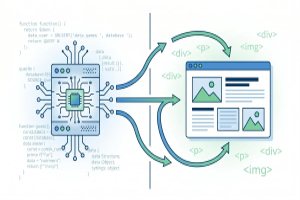
The CSR versus SSR debate is not merely a technical preference. For Austrian and DACH-market websites, it is a strategic decision affecting crawlability, indexation speed, and visibility.
Google has improved its JavaScript processing. However, “can crawl” and “does crawl efficiently” are different things. Research from Cal Poly’s computer science department confirms crawlers face persistent challenges with dynamically rendered content, particularly when JavaScript execution delays discovery of critical page elements.
Google’s crawler uses a two-pass system. The first pass sees raw HTML your server delivers. If that HTML contains little more than a <div id="root"></div> and a script tag, the crawler has almost nothing to index. The second pass executes JavaScript hours or days later, and not every page receives this treatment.
This matters because your technical SEO foundation depends on timely indexation. Research presented at KDD 2024 by Princeton, Georgia Tech, and IIT researchers noted that content discoverability remains dependent on how efficiently source material can be extracted from varying rendering architectures.
Client-side rendering excels when interactivity is the primary goal. Single-page applications benefit from CSR’s responsiveness — the browser loads once, and subsequent navigation happens without full page refreshes.
Server-side rendering sends fully formed HTML immediately. Crawlers see content, metadata, and internal links on the first pass. It also improves perceived performance on slower connections, relevant across rural Austrian and DACH-region mobile networks.
The penalty? SSR requires more server resources and complicates development. Hydration — where client-side JavaScript takes over server-rendered HTML — adds complexity.
Site Profile
Recommended Approach
Rationale
Content-heavy site with frequent updates
SSR or Static Generation
Fast indexation, minimal crawl budget waste
E-commerce catalog with 10,000+ products
SSR with selective hydration
Product details must be crawlable; interactivity loads progressively
SaaS application behind login walls
CSR acceptable
Visibility needed for marketing pages, not the app itself
Mixed public site + application
Hybrid: SSR for marketing, CSR for app
Best of both worlds; requires clear URL architecture
Interactive visual experience
SSR shell + CSR content
Metadata server-rendered; rich interactions client-loaded
Legacy CSR migration with SEO problems
Incremental SSR adoption
Address crawlability without full rebuild
A small Austrian SaaS company with fifteen marketing pages may not need SSR if content rarely changes and technical SEO fundamentals are sound. A large e-commerce platform may find that even SSR cannot solve crawl budget constraints without proper canonicalization.
The technical SEO mastery approach that works in Vienna may need adjustment for markets with different mobile infrastructure. Google’s rendering capabilities evolve, but Bing and other crawlers lag behind — relevant for DACH sites receiving traffic from multiple sources. Poorly implemented SSR creates more SEO secrets than it solves — hydration mismatches surfacing only in production.
Can Google fully crawl client-side rendered websites? Google executes JavaScript, but more slowly than HTML crawling. Critical content may remain unindexed for days, especially on large sites with limited crawl budget.
Is Next.js or Nuxt SSR enough to solve JavaScript SEO problems? These frameworks make SSR accessible, but implementation quality matters. Default configurations often miss metadata handling and proper status codes that technical SEO demands.
How do I test if my CSR site has crawlability issues? Check Google Search Console for spikes in “Crawled — currently not indexed” pages. Compare fetched versus rendered HTML in URL Inspection. Differing content signals a rendering gap.
Should Austrian e-commerce sites in DE/AT/CH handle rendering differently? Multilingual sites compound the challenge. SSR becomes more valuable because hreflang annotations must be present in the initial HTML for Google to process during the first crawl pass.
What is the simplest migration path from CSR to SSR? Start with highest-traffic templates — homepage, category pages, top product pages. Validate each template with Search Console before expanding.
Explore premium link-building options to boost your online visibility.